Gloomberb
Tech stack: TypeScript on OpenTUI (see opentui.md) License: (see repo) Serves: TRADECON (assigned by Josh; see cart map)
What it does
Section titled “What it does”Gloomberb is a Bloomberg-Terminal-style finance dashboard implemented as a TUI on top of OpenTUI. It pushes information density hard: many small panes share the screen, each owns a slice of market state, and the user pilots between them with mnemonic command codes (DES, GP, TOP) entered through a command bar — the same muscle memory pattern Bloomberg power users have. It also ships as both a native desktop app and a terminal binary from the same TypeScript code, courtesy of OpenTUI’s renderer.
Aspirational features for KN-86
Section titled “Aspirational features for KN-86”- Dense multi-pane dashboard. Information density without clutter, every cell of the grid earning its space. KN-86’s 80×25 grid begs for the same treatment in the Bare Deck Terminal and on the mission board surface.
- Mnemonic command-bar model (
Ctrl+P+ short codes). Three- or four-letter codes (DES,GP,TOP) instead of a fuzzy command palette. Faster once memorized, teachable through a built-in legend. Strong fit for KN-86 — the TERM key is already context-sensitive, and a “type a code, go to a function” entry mode is exactly what ADR-0016’s REPL/command surface wants. - Tiling window management. Dock, float, move, resize, gridlock. Less directly applicable to KN-86 (the device is single-cart-focused), but the gridlock concept — snap panes to the 80×25 grid — translates well to the emulator’s window-too-large case.
- Plugin architecture as the unit of extension. Panes, tabs, columns, commands, status widgets, and data providers are all plugins. KN-86 cartridges are not plugins (they’re capability modules), but the taxonomy (pane / tab / column / command / status widget / data provider) is a useful breakdown to compare to NoshAPI’s primitives.
- Dual desktop-app + TUI delivery from one codebase. KN-86 already ships a desktop emulator + a Pi build. Gloomberb / OpenTUI prove the single-source model works in production.
UX / interaction patterns
Section titled “UX / interaction patterns”- Command bar over menu.
Ctrl+Popens an input; type a code; jump. No nested menus, no mouse hunting. - Mnemonic > fuzzy. Codes are stable and learnable. A fuzzy palette is more discoverable but slower for repeat use; Gloomberb optimizes for the user who’s been doing this for a year.
- Pane focus + global commands. Local actions go to the focused pane; the command bar is global.
Visual style
Section titled “Visual style”- Bloomberg homage. Tight Unicode box-drawing, dense rows of numbers, status strips, ticker bars.
- Minimal chrome per pane. Each pane has a short title and gets out of the way. The data is the UI.
- OpenTUI’s component set. Text, Box, Input, Select, ScrollBox — composed with Yoga flexbox layout (CSS-like positioning).
Screenshot
Section titled “Screenshot”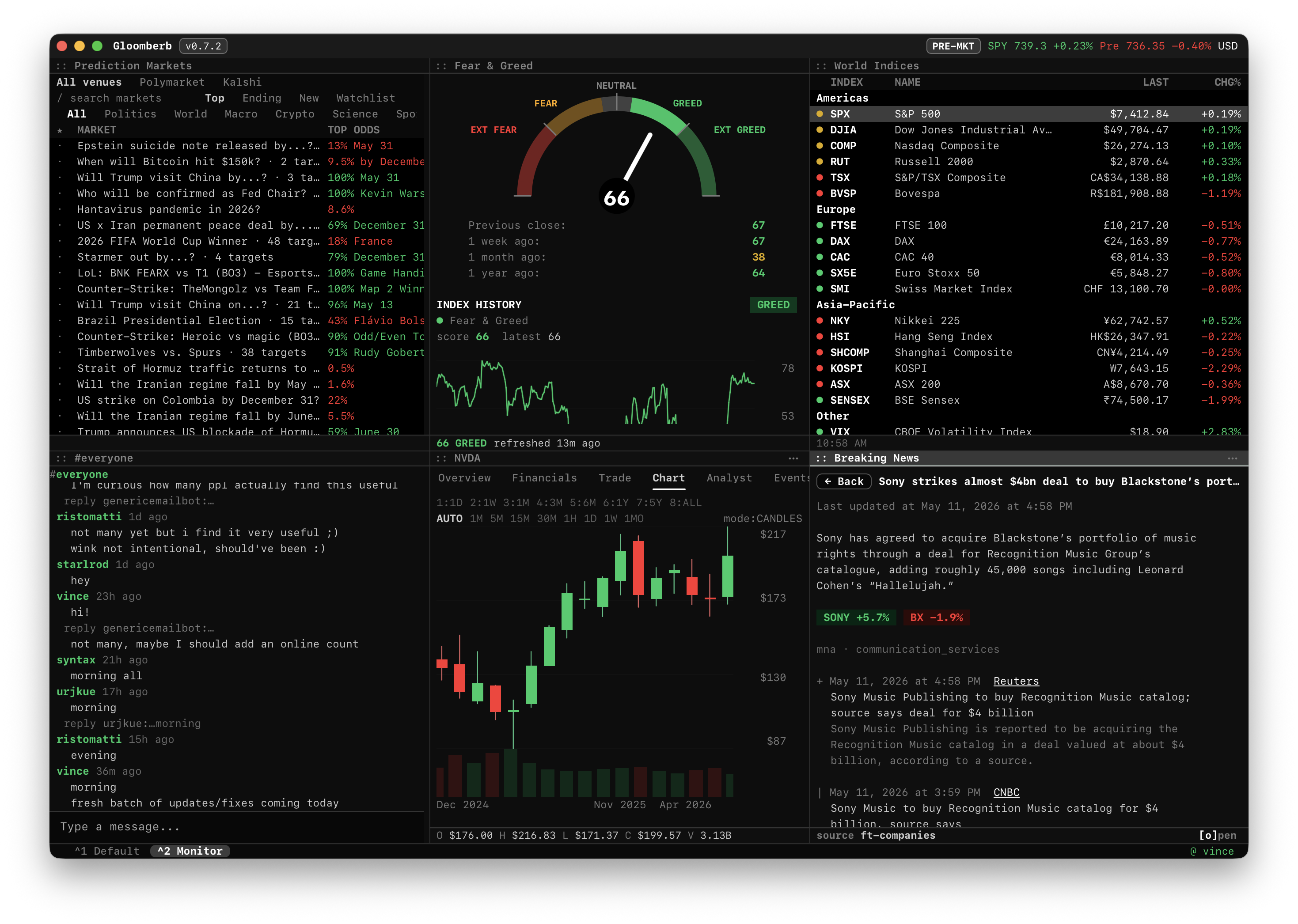
The shot in place (v0.7.2) is dense — worth annotating because every pane illustrates a borrowable pattern:
- Top status strip carries the app title (
Gloomberb v0.7.2), the pre-market state (PRE-MKT), and a live SPY ticker (SPY 739.3 +0.23% Pre 736.35 -0.40%) on the right edge. Exactly the use Row 0 should be put to on KN-86 — title + global state + at-a-glance live data. - Six panes below the status strip, each with a
:: Pane Nameheader in a leading double-colon style: Prediction Markets, Fear & Greed (with a semicircle gauge), World Indices,#everyonechat, NVDA chart (candles + volume), Breaking News. - Pane-internal tabs — the markets pane runs
All venues / Polymarket / Kalshi / search markets / Top / Ending / New / Watchlistalong its header. Two-level tab system inside a pane. - Color carries semantics, not decoration. Red = down / extreme fear / negative delta; green = up / greed / positive delta; amber = neutral; cyan = informational; magenta = chat handles. Six colors, each load-bearing.
- Bottom-left tab strip (
^1 Default ^2 Monitor) shows the workspace-level tab affordance —Ctrl+1/Ctrl+2swap layouts. Right edge shows@ vince— current user / session identity. - Box-drawing as scaffold. Pane separators are single-line Unicode box-drawing — the chrome stays out of the way; the data is the UI.
Notes / open questions for KN-86
Section titled “Notes / open questions for KN-86”- The mnemonic command bar pairs naturally with the TERM key. Sketch: TERM opens a 3–4-char code input on Row 24; type
MISto jump to mission board,SYSto system panel,LSPto REPL. Codes are documented in a built-in legend (the?overlay, à la Perkins). - KN-86 is not a plugin host (cartridges are not pane plugins), but the Bare Deck Terminal is multi-tab — STATUS / CIPHER / LAMBDA / LINK / SYS. Reading Gloomberb’s pane/tab/column/command/status-widget split is useful for sharpening what a Bare Deck “tab content brief” should and shouldn’t include.
- The Gloomberb experience depends on OpenTUI’s renderer + flexbox layout. KN-86’s text grid is integer-cell and fixed; the patterns (dense panes, command bar, focus model) transfer cleanly even though the engine doesn’t apply.