PulseDeck
Tech stack: Rust, Ratatui License: (see repo) Serves: knAmp (assigned by Josh; see cart map)
What it does
Section titled “What it does”PulseDeck is a terminal-native internet radio player styled as a retrowave cassette deck. The main window is laid out like a tape unit — a large PULSE DECK header with an A-SIDE panel that “plays” the currently selected stream — and the rest of the chrome (library browser, signal/visualizer pane, status row) hangs off that central metaphor. The aesthetic does real work: the deck/tape/signal vocabulary tells you what each pane is for before you read a single label.
Aspirational features for KN-86
Section titled “Aspirational features for KN-86”- Strong visual metaphor as the organizing principle. The whole UI commits to the cassette-deck conceit — header type, pane names, even the labels for actions. KN-86 has a comparable opportunity: the “Deckline” identity is right there in the name, and rows 0/24 are already chrome we control. Treat the firmware status/action rows as the device’s “tape labels,” not as generic header/footer text.
- Three-way layout cycling (
b). Split / Library-Focus / Signal-Focus. Same content, three working modes. Maps cleanly onto KN-86’s 80×25 grid: e.g. split (mission board + cart pane), focus-mission, focus-cart. One key, three modes, no menus. - Audio visualizers as a first-class surface (
v). RTA spectrum + an oscilloscope (real on a buffered source, simulated when the source can’t supply samples). For KN-86 this is the CIPHER-LINE OLED’s natural job — a YM2149 register/level visualizer there would land hard. - 6-theme system. Retrowave + four Catppuccin flavors + an ANSI-following “Terminal” theme that defers to the user’s term colors. KN-86 is monochrome amber, so the palette part doesn’t transfer, but the structure (a named theme registry the user can cycle) does — for KN-86 think of it as glyph/box-art treatments and CIPHER-LINE animation profiles, not colors.
- Preview-before-commit UX. Space auditions a stream; Enter saves+plays. The “audition vs. commit” split is widely applicable — cart preview before insert, mission preview before accept.
- Resilience patterns.
- Circular buffer for the signal pane so the visualizer never starves.
- Fade transitions across state changes so swaps don’t feel abrupt.
- Undo (
u). - Compact-screen protection below 80×24 — explicit guard rail, not a “may break” hope.
- Graceful error recovery (network dropout doesn’t kill the deck).
- Persistent session state. Last station, last theme, last layout — restored on launch. Aligns with KN-86’s Universal Deck State concept.
UX / interaction patterns
Section titled “UX / interaction patterns”- Keyboard-first. Single-key bindings carry most of the UI:
bcycles layout,vcycles visualizer,uundoes, Space previews, Enter commits. - Layout cycling instead of windowing. No tile-manager complexity. The user gets three pre-composed working modes and rotates between them.
- Audition / commit split. Distinct keys for “let me hear it” and “make it the current thing.” Reduces accidental state changes.
Visual style
Section titled “Visual style”- Cassette-deck chrome.
PULSE DECKmasthead,A-SIDEpanel, tape-labeled panes. - Box drawing for structure. Heavy use of Unicode box-drawing as actual UI scaffolding, not just decoration.
- Visualizers in-pane. RTA bars and oscilloscope traces rendered with block / braille characters inside the signal pane.
- Theme registry covers palette + accent treatment. Themes change more than the base color — they change the overall feel of the deck.
Screenshot
Section titled “Screenshot”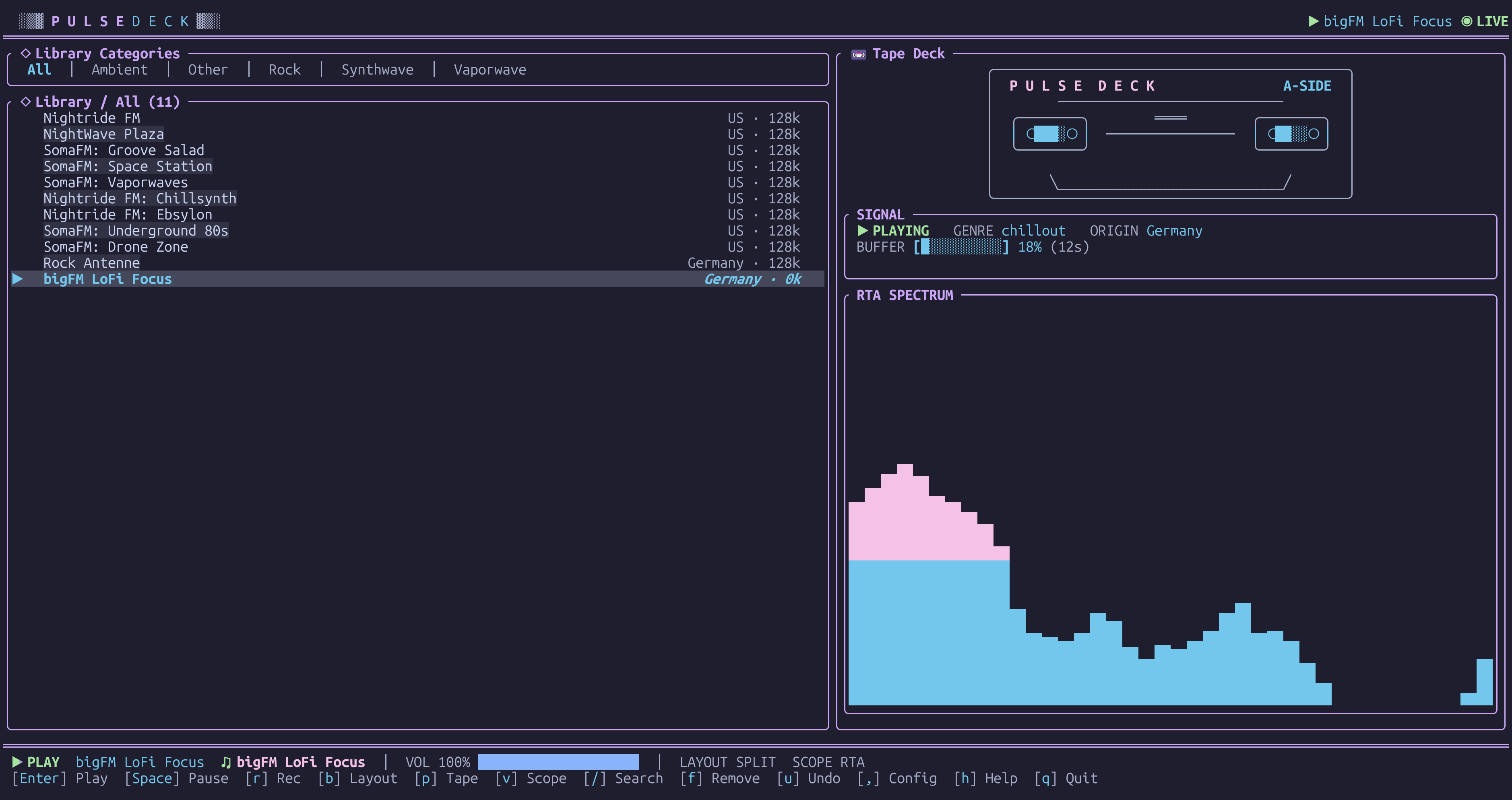
Notes / open questions for KN-86
Section titled “Notes / open questions for KN-86”- The CIPHER-LINE OLED is the obvious home for a PSG-driven visualizer (spectrum or scope). Worth scoping as a non-cart firmware surface — the Bare Deck Terminal could host it on the SYS tab.
- KN-86’s monochrome amber means PulseDeck’s palette work doesn’t transfer literally, but its theme-as-aesthetic-mode idea does. Candidate KN-86 “themes”: glyph treatment (Press Start 2P at 1×2 vs. native 12×24), box-art density, CIPHER-LINE animation profile, scanline / ghost overlay strength.
- The “compact-screen protection below 80×24” rule is a useful framing for KN-86: the 80×25 grid is fixed on device but the desktop emulator is resizable. Mirror PulseDeck’s rule — refuse to draw below the canonical grid, show a “WINDOW TOO SMALL” card instead of degrading.