NetWatch
Tech stack: Rust License: (see repo) Serves: Deck Hub; also bzbx (cross-listed 2026-07-29) (assigned by Josh; see cart map)
What it does
Section titled “What it does”NetWatch is a network-forensics TUI organized as a nine-tab dashboard — Dashboard, Connections, Interfaces, Packets, Stats, Topology, Timeline, Processes, Insights — addressable by number keys 1–9. It opens with zero configuration and is “useful in five seconds”: even without elevated permissions or pcap support it surfaces something (interface metadata, /proc stats, whatever the OS will give it) and tells you, in-band, which capability tier it’s running at. The forensics internals (TLS decryption, deep packet inspection) are out of scope for KN-86; the UX patterns are not.
Aspirational features for KN-86
Section titled “Aspirational features for KN-86”- Numbered-tab dashboard. Nine tabs, one digit each. The mental model is “press the number, see the view.” For KN-86, the 16-key phone-layout numpad makes this a natural fit —
1–9(or*/0/#for action keys) could address top-level surfaces inside the Bare Deck Terminal or any module-style cart. - Zero-config, “useful in 5 seconds” philosophy. No setup, no permission prompts, no empty-state nag. KN-86 already aims at the cold-power-on-to-useful gap — the Bare Deck Terminal is the analogous surface. Borrow NetWatch’s instinct: every surface should show something the second it’s drawn.
- Graceful capability degradation. NetWatch shows the active data source, never crashes, and lets the user know explicitly when a tier is unavailable. KN-86 parallels: no cart inserted, no microSD detected, coprocessor offline, battery low. Surface the state in-band, in the firmware status row, and keep going.
- Wireshark-style display-filter syntax. A small, learnable query DSL (“show only X”) inside the active view. For KN-86, missions-board and event-log surfaces could use a tiny filter grammar (e.g.
phase:active,rep:>50) on Row 24. - Sparklines, heatmaps, Gantt timelines. Tiny inline visualizations as first-class glyphs in the data view, not separate “graph” tools. Box-drawing and braille characters make these cheap on a text grid; CIPHER-LINE would be at home rendering a sparkline above the keyboard.
- 7-theme system with live switching (
t) and persistence. The lesson: themes are a user-visible setting you can rotate through with one key, and the choice survives a restart. (KN-86 is amber-on-black; the mechanism applies even though the palette doesn’t.) - Incident bundle export. “Snapshot the current state into a sharable file.” For KN-86 think: a Universal Deck State bundle the user can hand off (mission-board screencap + cart history + recent CIPHER lines + PSG state) for support, friends, or a planned save-share story.
UX / interaction patterns
Section titled “UX / interaction patterns”- Number keys = top-level navigation. Vim-cursor / arrow keys can stay for in-pane movement, but the digit keys jump.
- State badge in chrome. Active data tier (“real pcap” vs “/proc fallback”) always visible, never a surprise. For KN-86, encode cart state, coprocessor link state, and battery tier into Row 0.
- Live theme cycling.
trotates themes without leaving the current view. Theme persists. Translation for KN-86: a single-key cycle through aesthetic modes (e.g. glyph treatments / CIPHER-LINE animation profiles) persisted innosh-config.toml.
Visual style
Section titled “Visual style”- Tab-strip on top, data view below. Numbered tab labels along the top edge.
- Sparklines / heatmaps / Gantt timelines as inline glyphs. Not separate screens — they belong inside the row they describe.
- Theme-aware chrome. Same widgets, different palette.
Screenshot
Section titled “Screenshot”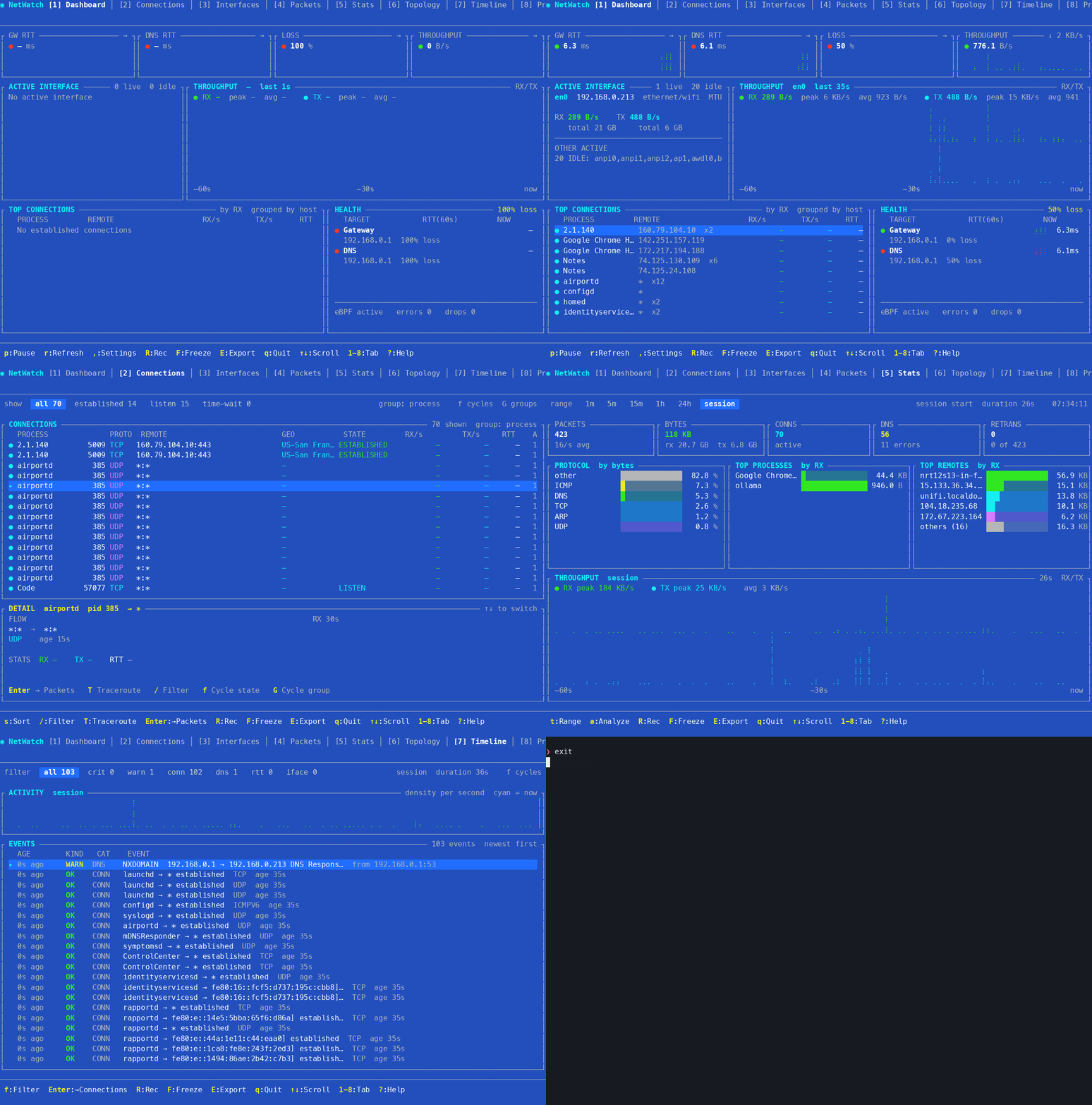
The animated GIF is doing real work here — it shows tab cycling, the live sparkline updates, and the theme switch (t) in motion. Static screenshots don’t carry the same payload.
Notes / open questions for KN-86
Section titled “Notes / open questions for KN-86”- Numbered-tab navigation is a direct fit for the phone-layout numpad. Worth piloting on the Bare Deck Terminal first:
1=STATUS,2=CIPHER,3=LAMBDA,4=LINK,5=SYS, with extension headroom up to9. Compare to the existing TERM-key model. - Graceful degradation as a doctrine. NetWatch’s principle (“show what you have, label the tier”) is exactly the right framing for the cart-absent, coprocessor-absent, and low-battery cases. Worth promoting to a runtime-spec doctrine, not just a per-surface feature.
- The “incident bundle” concept is interesting for KN-86’s social/share story — a single file that captures deck state at a moment. Out of scope for v0.1, but parking it here.