Kailh Choc Ergonomic Sculpted Keycaps — mugika9
- Source: https://www.printables.com/model/400911-kailh-choc-ergonomic-sculpted-keycaps
- Category:
prototype— printable sculpted Choc keycaps - Role for KN-86: an alternative / supplement to the MBK low-profile keycap commitment in the Buyer’s Guide. Sculpting (per-row contoured tops, optional finger-position-specific shaping) improves ergonomics on a 34-key split layout where every keypress matters and the operator’s fingers don’t translate sideways the way they do on a full 60+ key board.
- License / caveats: Printables per-model license — often CC-BY-NC / NoDerivatives. Verify mugika9’s specific license before remixing or printing for anything beyond personal use.
What it is
Section titled “What it is”A free Printables STL set by mugika9 for 3D-printable, ergonomically sculpted keycaps sized for Kailh Choc low-profile switches — the switch family the Ferris Sweep + KN-86 commit to. Where flat, uniform-profile MBK caps treat every key position identically, mugika9’s sculpted caps vary the cap geometry per row (and optionally per finger position) so the operator’s home-row fingers rest more naturally and the upper and lower rows angle slightly toward the home row. The effect on a 34-key split keyboard is non-trivial — typing accuracy and comfort both improve once the layout is in muscle memory.
Key takeaways for KN-86
Section titled “Key takeaways for KN-86”- Sculpted-vs-flat trade-off. The decided keycap commitment is MBK low-profile (per the Buyer’s Guide BOM checklist and prior ADR-0024-equivalent decisions). MBK ships from holykeebs and reads as a single coherent visual surface. mugika9’s sculpted set is the alternative path if we prioritise ergonomics over commercial sourcing:
- MBK pros: commercial supply, consistent quality, single coherent visual surface, ships with the holykeebs order
- MBK cons: flat profile means every key feels the same; on a 34-key ergo layout the operator’s pinky-column keys (which see less use and weaker fingers) get the same cap shape as the index-column keys
- Sculpted pros: ergonomically tuned per row; reduces finger travel; improves accuracy after muscle memory builds
- Sculpted cons: 3D-printed → quality is print-dependent (FDM layer lines may be visible, SLA preferred); per-key visual variety can read as busier; we have to print + finish ourselves
- Print quality matters disproportionately for keycaps. Keycaps are touched repeatedly under finger pressure; the print finish needs to be smooth enough not to be uncomfortable, and the layer-line direction matters (printing top-down can leave the touch surface ridged). SLA / resin printing produces meaningfully better results than FDM at this scale. If we go the sculpted route, print on resin if possible; FDM with high-resolution (0.1mm or better) layer height is the FDM fallback.
- Carry both options forward in the BOM. Recommend keeping MBK as the primary commitment (since they ship with the holykeebs order) and noting sculpted Choc (mugika9) as the documented alternative in case the operator-eye / operator-finger test on the assembled deck reveals MBK ergonomics aren’t where they need to be. The features-matrix tracks both with the trade-off; the keyboard-decision keeps MBK as canonical.
- Sculpting matters more on a 34-key board than on a full board. A 60-key board has redundancy — if a column is awkward, the same key is also reachable elsewhere via a different finger or a different layer. The Sweep’s 34 keys + QMK layers don’t have that redundancy: every physical key is used, often by a single specific finger, and getting the cap geometry right per finger is a non-trivial ergonomics win.
- Aesthetic consistency. Sculpted caps with a contoured shape read as more deliberately ergonomic and slightly less period-correct retro than flat MBK. KN-86’s Deckline identity is in the retro-cyberpunk family (Cyberdeck Cafe lineage); a flat-cap, uniform-row aesthetic ties tighter to that family. The sculpted option is a real ergonomics-wins-over-aesthetic-consistency call — worth making consciously rather than by default.
Decision posture
Section titled “Decision posture”The KN-86 canonical keycap commitment stays MBK for v0.1. The sculpted Choc set is documented as the alternative for operators who customize their deck post-build — the hotswap PCB (per keyboard-decision.md) makes the cap swap a no-tools, no-desolder operation.
A future spec update could promote the sculpted alternative if operator-eye testing reveals ergonomics are meaningfully better; until then, MBK is the project default.
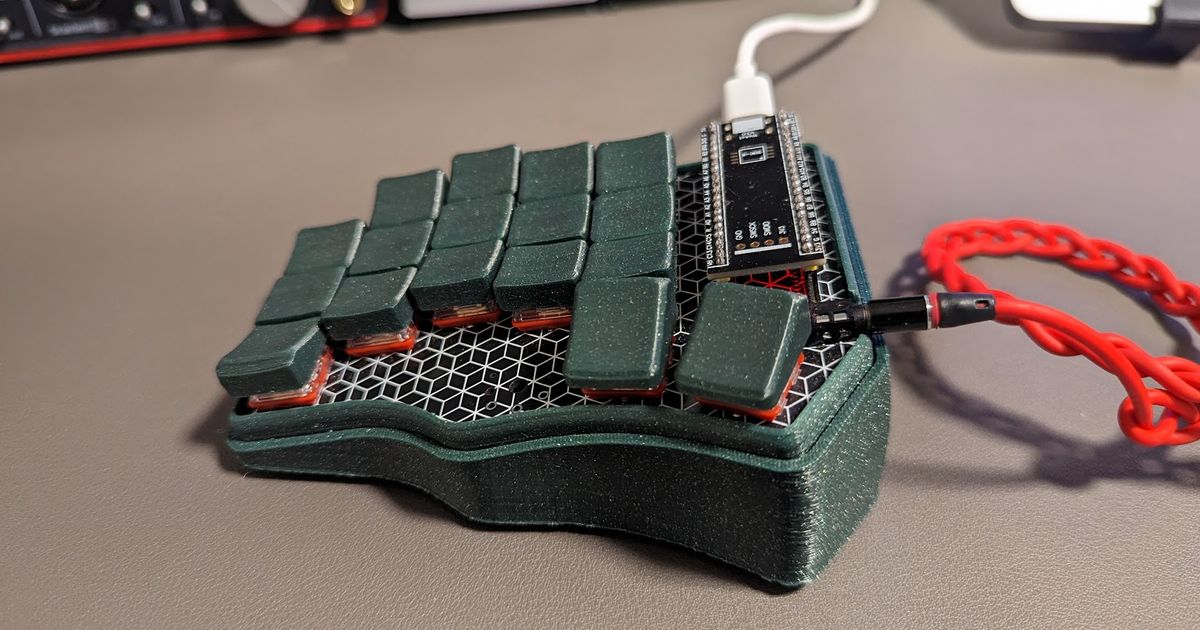
The Printables cover photo. Shows a Choc-spaced split keyboard with the sculpted caps installed — per-row contour visible across the keyboard surface.
- Cross-link keyboard-decision.md — the decision context this entry sits inside; MBK remains canonical.
- Cross-link ferris-sweep.md — the keyboard the caps fit on.
- Cross-link holykeebs-buyers-guide.md — the BOM checklist that ships MBK as the keycap commitment.
- Cross-link ferris-sweep-v2-case.md — the printable case sibling. Both this entry and the case are we-could-print-our-own alternatives to commercial holykeebs supply for the Sweep build.
- License check for the sculpted caps is non-trivial. CC-BY-NC / NoDerivatives is common on Printables for ergonomic-design models. Verify mugika9’s specific terms before any modification or distribution.