Screenshots — status
The per-project markdown files in ../ embed screenshots from this folder. Organized by batch matching ../index.md.
Batch 1 — TUI references
Section titled “Batch 1 — TUI references”In place ✅
Section titled “In place ✅”| File | Project | Source |
|---|---|---|
pulsedeck.png | PulseDeck | https://github.com/milgaj84/pulsedeck README |
gloomberb.png | Gloomberb | https://github.com/vincelwt/gloomberb — v0.7.2 full-dashboard capture |
netwatch.gif | NetWatch | https://github.com/matthart1983/netwatch README — animated demo |
golazo.gif | Golazo | https://github.com/0xjuanma/golazo README — animated demo |
perkins.png | Perkins | https://github.com/Mr-Robot-err-404/perkins README — ? help menu view |
vehicle-tui-concept.webp | Vehicle TUI Concept | Anonymous community concept image — see vehicle-tui-concept.md attribution note |
Still needed ⏳
Section titled “Still needed ⏳”| File | Project | Source | Notes |
|---|---|---|---|
opentui.png | OpenTUI | https://opentui.com | Component showcase / docs hero |
bae.png | BAE | https://github.com/geovanielegend/bae | Two-column alias-editor view |
cowsay-cpp.png | Cowsay in C++ | https://github.com/Ars-byte/Cowsay_In_Cpp | Any cowsay output |
zork.png | Zork | Box art attached to inspiration thread, 2026-06-06 | Commodore 64/128 cover |
zork-terminal.png (optional) | Zork | Frotz / Lectrote | Opening prose for box-vs-screen contrast |
Batch 2 — Hardware & aesthetic references
Section titled “Batch 2 — Hardware & aesthetic references”In place ✅
Section titled “In place ✅”| File | Reference | Source |
|---|---|---|
penkesu-hero.jpg | Penkesu Computer | https://github.com/penk/penkesu/raw/master/gallery/penkesu.computer-heroshot.jpg |
penkesu-parts.png | Penkesu Computer | https://github.com/penk/penkesu/raw/master/gallery/penkesu.computer-parts.png |
cyberdeck-cafe-gallery.png | The Cyberdeck Cafe | Browser capture of https://cyberdeck.cafe/ at 1440×1100 viewport (captured via Chrome DevTools MCP, 2026-06-06) |
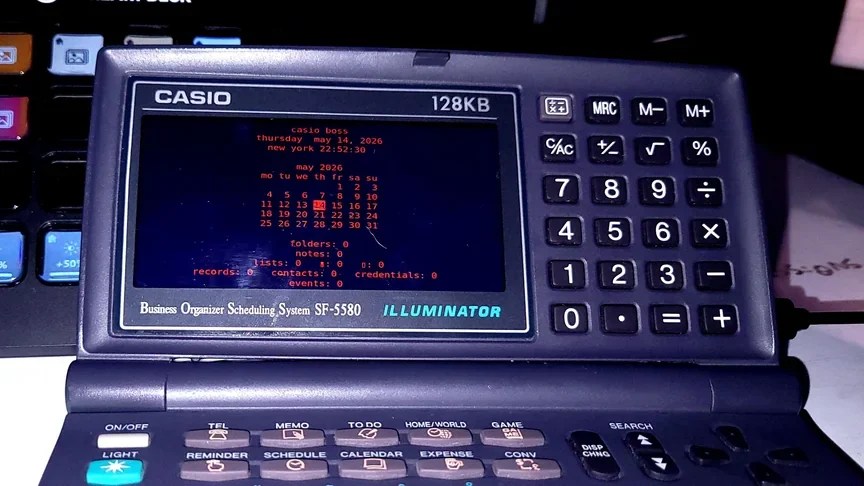
casio-organizer-retrofit.webp | Casio Organizer Retrofit | https://hackaday.com/wp-content/uploads/2026/05/1995-digital-organizer-gets-2nd-life-v0-ghjfbsyrr81h1-e1778999898832.webp |
os-models-1.mp4 + os-models-1.png | OS Models | https://i.imgur.com/fdaIV69.mp4 — middle-frame still extracted via ffmpeg |
os-models-2.mp4 + os-models-2.png | OS Models | https://i.imgur.com/P8zSi0I.mp4 — full ANSI palette grid still |
os-models-3.mp4 + os-models-3.png | OS Models | https://i.imgur.com/SKV1gJ1.mp4 — amber-on-black terminal still |
os-models-4.mp4 + os-models-4.png | OS Models | https://i.imgur.com/j7zD9MO.mp4 — color-picker UI still |


The OS Models entries keep both the MP4 (live animation) and a representative PNG still side by side because the animation carries information the stills can’t — the palette walkthrough.
Batch 3 — TUI apps & retro software
Section titled “Batch 3 — TUI apps & retro software”In place ✅
Section titled “In place ✅”| File | Project | Source |
|---|---|---|
rs-pug.png | rs-pug | GitHub user-attachments asset from the rs-pug README |
audium.gif | audium | docs/demo.gif from the audium repo |
cliamp.png | cliamp | Cliamp.png from the cliamp repo root |
aethertune.gif | AetherTune | img/showcase.gif from the AetherTune repo |
octoscope.png | octoscope | docs/screenshots/screenshot.png from the octoscope repo |
octoscope-phosphor-theme.png | octoscope | docs/themes/theme-phosphor.png — direct visual reference for the amber sibling theme |
l123.png | l123 | docs/iterm-screenshot.png from the l123 repo |
visicalc-archive.gif | VisiCalc | Internet Archive item VisiCalc_1979_SoftwareArts, emulator screenshot |
civilization-1991-archive.gif | Civilization 1991 | Internet Archive item msdos_Sid_Meiers_Civilization_1991, emulator screenshot |
gorillas-qbasic-archive.png | Gorillas QBASIC | Internet Archive item msdos_Gorillas_1991, emulator screenshot |
4trk-itch.png | 4TRK | Browser capture of jasonbmusic.itch.io/4trk (via Chrome DevTools MCP, 2026-06-06) |
x0xb0x.jpg | x0xb0x | Adafruit product photo cdn-shop.adafruit.com/970x728/3603-02.jpg |
The Archive screenshots for VisiCalc / Civilization / Gorillas are the Archive’s own item-tile emulator stills, not fresh captures — per the prompt, we do not download or run the archived software.
Sister-product research
Section titled “Sister-product research”Screenshots for ../strat-o-matic-college-football.md and any future KN-9x sister-product research material. These are not KN-86 references — see the entry’s “Important framing” section.
In place ✅
Section titled “In place ✅”| File | Target product | Source |
|---|---|---|
strat-o-matic-college-football.png | KN-90S Statline | Browser viewport capture of https://www.strat-o-matic.com/football-college-digital-games/ |
strat-o-matic-college-football-fullpage.png | KN-90S Statline | Browser full-page capture of the same URL |
Possible follow-ups
Section titled “Possible follow-ups”- Crop the Strat-O-Matic in-game stat-grid thumbnail out of
strat-o-matic-college-football.pnginto a standalonestrat-o-matic-statgrid-thumbnail.png— the actual asset the entry references is the small green grid in the bottom-left of the product page, not the page chrome around it. - Re-extract OS Models frames at different timestamps if a different moment in any of the four videos better captures the intent — the current stills are middle-frame; an end-of-walkthrough frame might show a more complete palette state on some clips.
Conventions
Section titled “Conventions”- PNG for stills, GIF for demos that need motion, WebP and MP4 fine for either. The markdown files reference whichever extension the source landed as. Don’t re-encode between formats.
- No size constraint. Each project file embeds the image with
— Markdown viewers will scale appropriately. - Filename matches the project markdown filename where the project has a single image; multi-image entries (Penkesu, OS Models, Strat-O-Matic) use a stable per-image suffix.
- Attribution caution. For the Vehicle TUI Concept and the OS Models clips, the original creators aren’t clearly identified at the source. Treat these images as reference for design conversation only — do not redistribute in pitch decks, the rendered Starlight site, or marketing materials without sourcing/crediting (or commissioning clean replacements).
After dropping the remaining images
Section titled “After dropping the remaining images”No build step needed — the inspiration/ folder is outside the Starlight sync, so images render directly from the markdown links when viewed in any markdown reader (GitHub, VS Code preview, Obsidian, etc.).