Golazo
Tech stack: Go, Charm stack (Bubble Tea, Lip Gloss, Bubbles) License: (see repo) Serves: KN-90S Statline (assigned by Josh; see cart map)
What it does
Section titled “What it does”Golazo is a live football-match TUI: a left-hand list of matches, a right-hand detail pane for the focused match. The detail pane is unapologetically the headline of the app — a giant stylized scoreline anchors it, an event timeline (goals, cards, subs) runs underneath, and horizontal stat bars show possession, shots, and passes at a glance. Navigation is vim-flavored with arrow fallbacks, / opens a filter, Tab swaps focus. The app ships with a self-update mechanism so the user never has to think about versions.
Aspirational features for KN-86
Section titled “Aspirational features for KN-86”- Two-pane master/detail layout. A list of things on the left (with a focused-border indication), a detail view on the right. Maps directly onto KN-86 surfaces that have “many of X, one focused” semantics — mission board, cart selection, dispatch transmissions.
- Headline scoreline / big-glyph identity object. Each match has a giant, stylized scoreline at the top of the detail pane — instantly readable from across the room. KN-86 equivalent: each module’s content surface gets a one-glance identity glyph (mission name in oversize Press Start 2P, current phase, the headline number). Use Row 1 wide and tall, not for tiny labels.
- Event timeline. Vertical list of timestamped events with single-glyph markers (goal, card, sub). Direct port for KN-86: mission event log, dispatch history, phase-chain progress.
- Horizontal stat bars. Two-team bars filling left/right from center — possession 60/40, shots 12/8. Box-drawing characters do this beautifully on an 80-column grid. Useful for KN-86 reputation comparisons, faction standings, any A-vs-B contrast.
- Vim-style + arrow navigation. Both work. Cheap to support, doubles the audience.
/to filter,Tabto swap focus. Two universal conventions worth committing to.- Self-update mechanism. “App tells me there’s a new version, I press a key, it’s done.” For KN-86 this is the firmware update story (ADR-0011 /
device/os/update-system.md) — the UX lesson is “make it a one-key affordance, not a docs page.”
UX / interaction patterns
Section titled “UX / interaction patterns”- Master/detail with explicit focus border. Whichever pane is focused gets a brighter / different border. No ambiguity about where keystrokes go.
Tabswaps focus between master and detail. Vim users geth/l; everyone else getsTab./opens filter. Universal grep-like discoverability for any list.- Self-update prompt is in-app. Not a separate command, not a
--check-updatesflag.
Visual style
Section titled “Visual style”- Charm/Lip Gloss aesthetic. Soft borders, padded panes, restrained color. Generous whitespace inside boxes.
- Big stylized scoreline as the focal point. The thing the user came to see is the biggest thing on screen.
- Single-glyph event markers. Quick visual scan of the timeline. Easy port to CP437.
Screenshot
Section titled “Screenshot”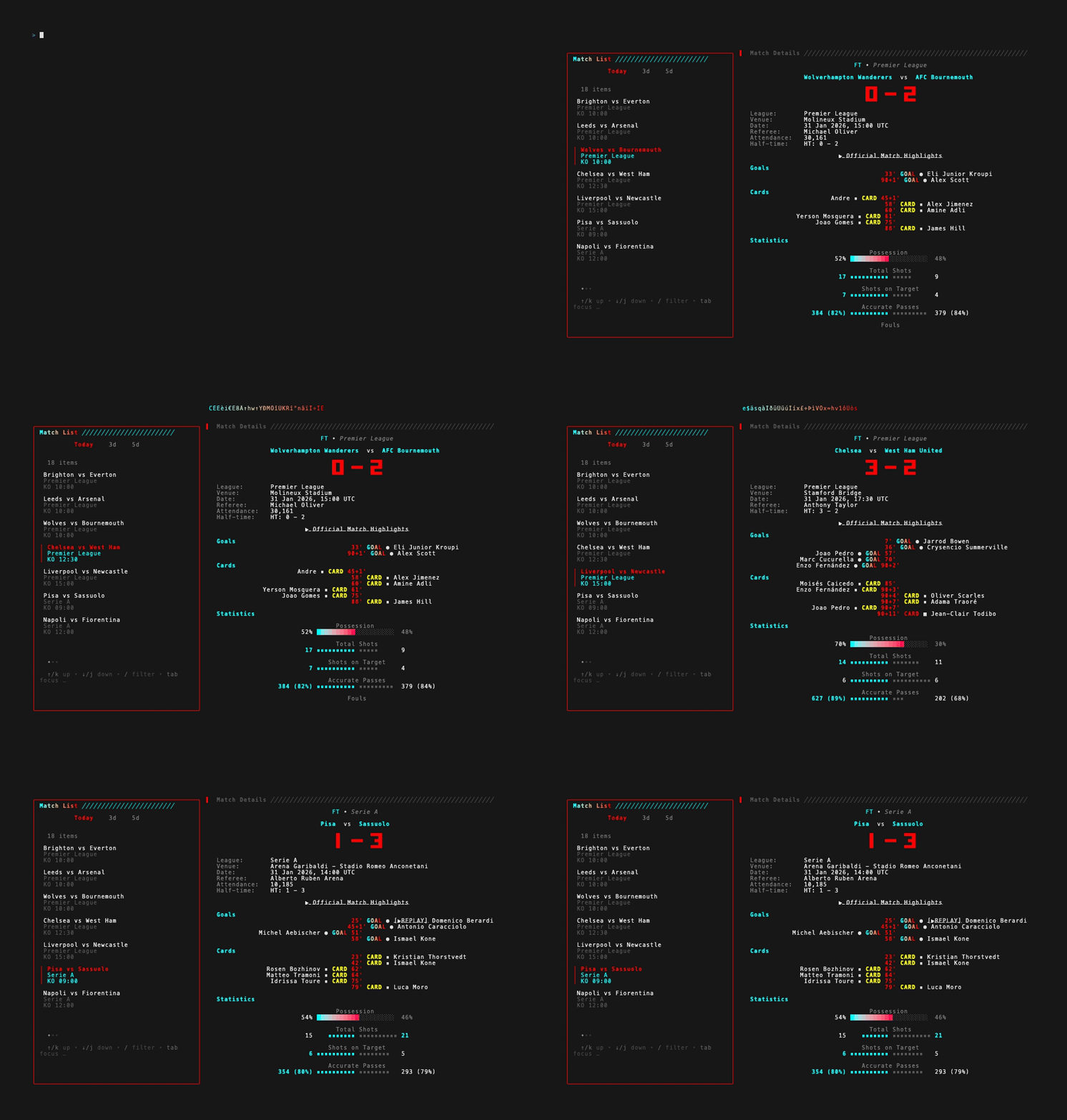
The animated GIF captures the master/detail focus swap and live event-timeline updates — useful for seeing how the focused border, scoreline refresh, and stat-bar redraws sequence together.
Notes / open questions for KN-86
Section titled “Notes / open questions for KN-86”- The “big headline identity object” is the strongest borrowable pattern here and applies broadly: cart name + phase on cart-load, mission name on accept, dispatch transmission ID on view. KN-86 already has the bitmap glyph engine; Press Start 2P at native 12×24 can carry these in style.
- Two-pane master/detail is the default for many KN-86 surfaces — worth designating as a screen-design rule alongside the existing Row 0 / Rows 1–23 / Row 24 contract. A “list-detail” baseline (e.g. 30/50 column split inside Rows 1–23) gives cart authors a shared starting point.
- The self-update affordance is a UX lesson, not an architecture one — KN-86 has its own update mechanism; the design rule to lift is “expose it as a one-key path from inside the deck, not as a menu spelunk.”